<?xml version="1.0" encoding="utf-8"?><feed xmlns="http://www.w3.org/2005/Atom" xml:lang="en-US"><generator uri="https://jekyllrb.com/" version="3.10.0">Jekyll</generator><link href="https://kramnameloc.com/feed.xml" rel="self" type="application/atom+xml" /><link href="https://kramnameloc.com/" rel="alternate" type="text/html" hreflang="en-US" /><updated>2026-03-11T23:03:02-04:00</updated><id>https://kramnameloc.com/feed.xml</id><title type="html">Kramnameloc</title><subtitle>Notes on software, automation, and thoughtful engineering.</subtitle><author><name>Kramnameloc</name></author><entry><title type="html">Automating Disney</title><link href="https://kramnameloc.com/automating-disney/" rel="alternate" type="text/html" title="Automating Disney" /><published>2021-04-29T22:05:43-04:00</published><updated>2021-04-29T22:05:43-04:00</updated><id>https://kramnameloc.com/automating-disney</id><content type="html" xml:base="https://kramnameloc.com/automating-disney/"><![CDATA[<h2 id="the-problem">The Problem</h2>

<p>My family had the dream of going to Disney for my sister in law birthday in April and after coordinating the house, plane tickets, multiple families, and tickets we had a problem.  The park tickets were not purchased at the exact same moment and some of the family was not able to <a href="https://disneyworld.disney.go.com/experience-updates/park-reservations/">reserve their park</a>! How could we fix this so the family can go to the park together?</p>

<h2 id="the-calendar">The Calendar</h2>
<p><img src="/assets/blog-images/2021-04-29-automating-disney/01-calendar.png" alt="Illustration from Automating Disney (1)" />
We could do the following…</p>

<ul>
  <li>Manually Click Dates</li>
  <li>Check Available Parks</li>
  <li>Repeat above…forever…hoping to get lucky</li>
</ul>

<p>This clearly is not something we can do…there must be a way to dig deeper and automate the checking.</p>

<h2 id="finding-the-data">Finding The Data</h2>
<p><img src="/assets/blog-images/2021-04-29-automating-disney/02-preview.png" alt="Illustration from Automating Disney (2)" /></p>

<p>Lets look to see how the calendar actually works.</p>

<ul>
  <li>Inspect page load via developer tools</li>
  <li>Check XHR to see if there are any api requests….</li>
  <li>Looking through the requests we see <code class="language-plaintext highlighter-rouge">calendar</code></li>
</ul>

<h2 id="the-api">The API</h2>

<p>If you view the request in a new window we get some nicely formatted <code class="language-plaintext highlighter-rouge">json</code> and the url is human readable.</p>

<blockquote>
  <p>https://disneyworld.disney.go.com/availability-calendar/api/calendar?segment=tickets&amp;startDate=2021-04-05&amp;endDate=2021-04-30</p>
</blockquote>

<p>Thankful we see that the query string has a lot of helpful parameters</p>

<ul>
  <li><code class="language-plaintext highlighter-rouge">startDate</code></li>
  <li><code class="language-plaintext highlighter-rouge">endDate</code></li>
  <li><code class="language-plaintext highlighter-rouge">segment</code></li>
</ul>

<h2 id="decoding-response">Decoding Response</h2>

<p>Now that we discovered the format of the request next we need to understand the response.</p>

<div class="language-json highlighter-rouge"><div class="highlight"><pre class="highlight"><code><span class="p">[</span><span class="w">
  </span><span class="p">{</span><span class="w">
    </span><span class="nl">"date"</span><span class="p">:</span><span class="w"> </span><span class="s2">"2021-04-17"</span><span class="p">,</span><span class="w">
    </span><span class="nl">"availability"</span><span class="p">:</span><span class="w"> </span><span class="s2">"none"</span><span class="p">,</span><span class="w">
    </span><span class="nl">"parks"</span><span class="p">:</span><span class="w"> </span><span class="p">[]</span><span class="w">
  </span><span class="p">},</span><span class="w">
  </span><span class="p">{</span><span class="w">
    </span><span class="nl">"date"</span><span class="p">:</span><span class="w"> </span><span class="s2">"2021-04-18"</span><span class="p">,</span><span class="w">
    </span><span class="nl">"availability"</span><span class="p">:</span><span class="w"> </span><span class="s2">"partial"</span><span class="p">,</span><span class="w">
    </span><span class="nl">"parks"</span><span class="p">:</span><span class="w"> </span><span class="p">[</span><span class="w">
      </span><span class="s2">"80007838"</span><span class="w">
    </span><span class="p">]</span><span class="w">
  </span><span class="p">},</span><span class="w">
  </span><span class="p">{</span><span class="w">
    </span><span class="nl">"date"</span><span class="p">:</span><span class="w"> </span><span class="s2">"2021-04-19"</span><span class="p">,</span><span class="w">
    </span><span class="nl">"availability"</span><span class="p">:</span><span class="w"> </span><span class="s2">"partial"</span><span class="p">,</span><span class="w">
    </span><span class="nl">"parks"</span><span class="p">:</span><span class="w"> </span><span class="p">[</span><span class="w">
      </span><span class="s2">"80007838"</span><span class="w">
    </span><span class="p">]</span><span class="w">
  </span><span class="p">},</span><span class="w">
  </span><span class="p">{</span><span class="w">
    </span><span class="nl">"date"</span><span class="p">:</span><span class="w"> </span><span class="s2">"2021-04-20"</span><span class="p">,</span><span class="w">
    </span><span class="nl">"availability"</span><span class="p">:</span><span class="w"> </span><span class="s2">"partial"</span><span class="p">,</span><span class="w">
    </span><span class="nl">"parks"</span><span class="p">:</span><span class="w"> </span><span class="p">[</span><span class="w">
      </span><span class="s2">"80007823"</span><span class="p">,</span><span class="w">
      </span><span class="s2">"80007838"</span><span class="w">
    </span><span class="p">]</span><span class="w">
  </span><span class="p">}</span><span class="w">
</span><span class="p">]</span><span class="w">
</span></code></pre></div></div>
<p>The good news the json response is fairly straight forward except for some magic numbers.</p>

<ul>
  <li><code class="language-plaintext highlighter-rouge">date</code></li>
  <li><code class="language-plaintext highlighter-rouge">availability</code></li>
  <li><code class="language-plaintext highlighter-rouge">parks</code> list of parks that are available
    <ul>
      <li><code class="language-plaintext highlighter-rouge">Epcot 80007838</code></li>
      <li><code class="language-plaintext highlighter-rouge">Animal Kingdom 80007823</code></li>
      <li><code class="language-plaintext highlighter-rouge">Magic Kingdom 80007944</code></li>
      <li><code class="language-plaintext highlighter-rouge">Hollywood Studios  80007998</code></li>
    </ul>
  </li>
</ul>

<p><em>We were able to reverse engineer the above magic numbers by clicking around the calendar and recording which numbers showed up compared to what was displayed on the screen.</em></p>

<h2 id="nodejs">NodeJs</h2>

<p>Now that we had an api, understood the request and response lets use turn this into a small program using NodeJs and <a href="https://github.com/axios/axios"><code class="language-plaintext highlighter-rouge">🔗axios</code></a>.  Our program will need to do the following.</p>

<ul>
  <li>Request Data from the API</li>
  <li>Parse the response</li>
  <li>If availability do…….something.</li>
</ul>

<p>Once we put this all together we ended up with the following.</p>

<div class="language-javascript highlighter-rouge"><div class="highlight"><pre class="highlight"><code><span class="kd">const</span> <span class="nx">axios</span> <span class="o">=</span> <span class="nx">require</span><span class="p">(</span><span class="dl">"</span><span class="s2">axios</span><span class="dl">"</span><span class="p">);</span>

<span class="kd">let</span> <span class="nx">url</span> <span class="o">=</span>
    <span class="dl">"</span><span class="s2">https://disneyworld.disney.go.com/availability-calendar/api/calendar?segment=tickets&amp;startDate=2021-04-17&amp;endDate=2021-04-17</span><span class="dl">"</span><span class="p">;</span>

<span class="p">(</span><span class="k">async</span> <span class="p">()</span> <span class="o">=&gt;</span> <span class="p">{</span>
    <span class="k">try</span> <span class="p">{</span>
        <span class="kd">const</span> <span class="nx">response</span> <span class="o">=</span> <span class="k">await</span> <span class="nx">axios</span><span class="p">.</span><span class="kd">get</span><span class="p">(</span><span class="nx">url</span><span class="p">);</span>

        <span class="kd">var</span> <span class="nx">epcot</span> <span class="o">=</span> <span class="dl">"</span><span class="s2">80007838</span><span class="dl">"</span><span class="p">;</span>
        <span class="kd">var</span> <span class="nx">animalKingdom</span> <span class="o">=</span> <span class="dl">"</span><span class="s2">80007823</span><span class="dl">"</span><span class="p">;</span>
        <span class="kd">var</span> <span class="nx">magicKingdom</span> <span class="o">=</span> <span class="dl">"</span><span class="s2">80007944</span><span class="dl">"</span><span class="p">;</span>
        <span class="kd">var</span> <span class="nx">hollywood</span> <span class="o">=</span> <span class="dl">"</span><span class="s2">80007998</span><span class="dl">"</span><span class="p">;</span>

        <span class="kd">var</span> <span class="nx">message</span> <span class="o">=</span> <span class="dl">""</span><span class="p">;</span>
        <span class="kd">var</span> <span class="nx">alert</span> <span class="o">=</span> <span class="kc">false</span><span class="p">;</span>

        <span class="nx">response</span><span class="p">.</span><span class="nx">data</span><span class="p">.</span><span class="nx">forEach</span><span class="p">((</span><span class="nx">date</span><span class="p">)</span> <span class="o">=&gt;</span> <span class="p">{</span>
            <span class="nx">message</span> <span class="o">+=</span> <span class="s2">`Date: </span><span class="p">${</span><span class="nx">date</span><span class="p">.</span><span class="nx">date</span><span class="p">}</span><span class="s2"> | Parks:`</span><span class="p">;</span>
            <span class="kd">var</span> <span class="nx">parkNames</span> <span class="o">=</span> <span class="p">[];</span>
            <span class="nx">date</span><span class="p">.</span><span class="nx">parks</span><span class="p">.</span><span class="nx">forEach</span><span class="p">((</span><span class="nx">park</span><span class="p">)</span> <span class="o">=&gt;</span> <span class="p">{</span>
                <span class="k">if</span> <span class="p">(</span><span class="nx">park</span> <span class="o">===</span> <span class="nx">epcot</span><span class="p">)</span> <span class="p">{</span>
                    <span class="nx">parkNames</span><span class="p">.</span><span class="nx">push</span><span class="p">(</span><span class="dl">"</span><span class="s2">Epcot</span><span class="dl">"</span><span class="p">);</span>
                <span class="p">}</span>
                <span class="k">if</span> <span class="p">(</span><span class="nx">park</span> <span class="o">===</span> <span class="nx">animalKingdom</span><span class="p">)</span> <span class="p">{</span>
                    <span class="nx">parkNames</span><span class="p">.</span><span class="nx">push</span><span class="p">(</span><span class="dl">"</span><span class="s2">Animal Kingdom</span><span class="dl">"</span><span class="p">);</span>
                <span class="p">}</span>
                <span class="k">if</span> <span class="p">(</span><span class="nx">park</span> <span class="o">===</span> <span class="nx">magicKingdom</span><span class="p">)</span> <span class="p">{</span>
                    <span class="nx">alert</span> <span class="o">=</span> <span class="kc">true</span><span class="p">;</span>
                    <span class="nx">parkNames</span><span class="p">.</span><span class="nx">push</span><span class="p">(</span><span class="dl">"</span><span class="s2">Magic Kingdom</span><span class="dl">"</span><span class="p">);</span>
                <span class="p">}</span>
                <span class="k">if</span> <span class="p">(</span><span class="nx">park</span> <span class="o">===</span> <span class="nx">hollywood</span><span class="p">)</span> <span class="p">{</span>
                    <span class="nx">parkNames</span><span class="p">.</span><span class="nx">push</span><span class="p">(</span><span class="dl">"</span><span class="s2">Hollywood</span><span class="dl">"</span><span class="p">);</span>
                <span class="p">}</span>
            <span class="p">});</span>
            <span class="nx">message</span> <span class="o">+=</span> <span class="s2">`</span><span class="p">${</span><span class="nx">parkNames</span><span class="p">.</span><span class="nx">join</span><span class="p">()}</span><span class="s2"> \n`</span><span class="p">;</span>
        <span class="p">});</span>
        <span class="k">if</span> <span class="p">(</span><span class="nx">alert</span><span class="p">)</span> <span class="p">{</span>
            <span class="c1">//send alert</span>
        <span class="p">}</span>
    <span class="p">}</span> <span class="k">catch</span> <span class="p">(</span><span class="nx">error</span><span class="p">)</span> <span class="p">{</span>
        <span class="nx">console</span><span class="p">.</span><span class="nx">log</span><span class="p">(</span><span class="nx">error</span><span class="p">.</span><span class="nx">response</span><span class="p">.</span><span class="nx">body</span><span class="p">);</span>
    <span class="p">}</span>
<span class="p">})();</span>
</code></pre></div></div>

<p>As you can see from the above we parsed the response and then captured the parks that are available and only trigger an alert for <code class="language-plaintext highlighter-rouge">Magic Kingdom</code> as that was the park the family wanted to go to on the day <code class="language-plaintext highlighter-rouge">2021-04-17</code></p>

<h2 id="automation">Automation</h2>
<p>Now that we had a node program we needed to run this on a schedule to automagically check ever so often to see if any new parks open up. We could run via cron or similar scheduling tools, manually run it, or a server-less approach.</p>

<p><img src="/assets/blog-images/2021-04-29-automating-disney/03-pipedream.png" alt="Illustration from Automating Disney (3)" /></p>

<p>I decided to go with <a href="https://pipedream.com">pipedream</a> as it ticked all the boxes.</p>

<blockquote>
  <p>Stop writing boilerplate code, struggling with authentication and managing infrastructure. Start connecting APIs with code-level control when you need it — and no code when you don’t.</p>
</blockquote>

<h3 id="convert-to-workflow">Convert to Workflow</h3>

<p>It was fairly straightforward to convert the NodeJs program to a pipe dream workflow as it had node support at its core which made the migration easy.</p>

<h3 id="steps">Steps</h3>

<p>The first thing we needed to do is define a few steps to help flow together what has to happen at each execution along the way.</p>

<h4 id="dates">Dates</h4>

<p>We had a step for date that just returns the date we want to check for the calendar checking step.</p>

<div class="language-javascript highlighter-rouge"><div class="highlight"><pre class="highlight"><code><span class="k">async</span> <span class="p">(</span><span class="nx">event</span><span class="p">,</span> <span class="nx">steps</span><span class="p">)</span> <span class="o">=&gt;</span> <span class="p">{</span>
    <span class="k">return</span> <span class="p">{</span>
        <span class="na">date</span><span class="p">:</span> <span class="dl">"</span><span class="s2">2021-04-17</span><span class="dl">"</span>
    <span class="p">}</span>
<span class="p">}</span>
</code></pre></div></div>

<h4 id="check-api">Check API</h4>

<p>As you can see this is a fairly easy migration but a few changes happened to make it work in pipedream</p>

<ul>
  <li>pass in the <code class="language-plaintext highlighter-rouge">date</code> via the <code class="language-plaintext highlighter-rouge">steps</code> object <code class="language-plaintext highlighter-rouge">steps.date_to_check.$return_value.date;</code></li>
  <li>return an object so it can be used in future steps</li>
</ul>

<div class="language-javascript highlighter-rouge"><div class="highlight"><pre class="highlight"><code>        <span class="k">return</span> <span class="p">{</span>
            <span class="na">alert</span><span class="p">:</span> <span class="nx">alert</span><span class="p">,</span>
            <span class="na">message</span><span class="p">:</span> <span class="nx">message</span>
        <span class="p">};</span>
</code></pre></div></div>

<div class="language-javascript highlighter-rouge"><div class="highlight"><pre class="highlight"><code><span class="k">async</span> <span class="p">(</span><span class="nx">event</span><span class="p">,</span> <span class="nx">steps</span><span class="p">)</span> <span class="o">=&gt;</span> <span class="p">{</span>
    <span class="kd">const</span> <span class="nx">axios</span> <span class="o">=</span> <span class="nx">require</span><span class="p">(</span><span class="dl">"</span><span class="s2">axios</span><span class="dl">"</span><span class="p">);</span>

    <span class="kd">let</span> <span class="nx">date</span> <span class="o">=</span> <span class="nx">steps</span><span class="p">.</span><span class="nx">date_to_check</span><span class="p">.</span><span class="nx">$return_value</span><span class="p">.</span><span class="nx">date</span><span class="p">;</span>
    <span class="kd">let</span> <span class="nx">url</span> <span class="o">=</span>
        <span class="s2">`https://disneyworld.disney.go.com/availability-calendar/api/calendar?segment=tickets&amp;startDate=</span><span class="p">${</span><span class="nx">date</span><span class="p">}</span><span class="s2">&amp;endDate=</span><span class="p">${</span><span class="nx">date</span><span class="p">}</span><span class="s2">`</span><span class="p">;</span>

    <span class="k">try</span> <span class="p">{</span>
        <span class="kd">const</span> <span class="nx">response</span> <span class="o">=</span> <span class="k">await</span> <span class="nx">axios</span><span class="p">.</span><span class="kd">get</span><span class="p">(</span><span class="nx">url</span><span class="p">);</span>

        <span class="kd">var</span> <span class="nx">epcot</span> <span class="o">=</span> <span class="dl">"</span><span class="s2">80007838</span><span class="dl">"</span><span class="p">;</span>
        <span class="kd">var</span> <span class="nx">animalKingdom</span> <span class="o">=</span> <span class="dl">"</span><span class="s2">80007823</span><span class="dl">"</span><span class="p">;</span>
        <span class="kd">var</span> <span class="nx">magicKingdom</span> <span class="o">=</span> <span class="dl">"</span><span class="s2">80007944</span><span class="dl">"</span><span class="p">;</span>
        <span class="kd">var</span> <span class="nx">hollywood</span> <span class="o">=</span> <span class="dl">"</span><span class="s2">80007998</span><span class="dl">"</span><span class="p">;</span>

        <span class="kd">var</span> <span class="nx">message</span> <span class="o">=</span> <span class="dl">""</span><span class="p">;</span>
        <span class="kd">var</span> <span class="nx">alert</span> <span class="o">=</span> <span class="kc">false</span><span class="p">;</span>

        <span class="nx">response</span><span class="p">.</span><span class="nx">data</span><span class="p">.</span><span class="nx">forEach</span><span class="p">((</span><span class="nx">date</span><span class="p">)</span> <span class="o">=&gt;</span> <span class="p">{</span>
            <span class="nx">message</span> <span class="o">+=</span> <span class="s2">`Date: </span><span class="p">${</span><span class="nx">date</span><span class="p">.</span><span class="nx">date</span><span class="p">}</span><span class="s2"> | Parks:`</span><span class="p">;</span>
            <span class="kd">var</span> <span class="nx">parkNames</span> <span class="o">=</span> <span class="p">[];</span>
            <span class="nx">date</span><span class="p">.</span><span class="nx">parks</span><span class="p">.</span><span class="nx">forEach</span><span class="p">((</span><span class="nx">park</span><span class="p">)</span> <span class="o">=&gt;</span> <span class="p">{</span>
                <span class="k">if</span> <span class="p">(</span><span class="nx">park</span> <span class="o">===</span> <span class="nx">epcot</span><span class="p">)</span> <span class="p">{</span>
                    <span class="nx">parkNames</span><span class="p">.</span><span class="nx">push</span><span class="p">(</span><span class="dl">"</span><span class="s2">Epcot</span><span class="dl">"</span><span class="p">);</span>
                <span class="p">}</span>
                <span class="k">if</span> <span class="p">(</span><span class="nx">park</span> <span class="o">===</span> <span class="nx">animalKingdom</span><span class="p">)</span> <span class="p">{</span>
                    <span class="nx">parkNames</span><span class="p">.</span><span class="nx">push</span><span class="p">(</span><span class="dl">"</span><span class="s2">Animal Kingdom</span><span class="dl">"</span><span class="p">);</span>
                <span class="p">}</span>
                <span class="k">if</span> <span class="p">(</span><span class="nx">park</span> <span class="o">===</span> <span class="nx">magicKingdom</span><span class="p">)</span> <span class="p">{</span>
                    <span class="nx">alert</span> <span class="o">=</span> <span class="kc">true</span><span class="p">;</span>
                    <span class="nx">parkNames</span><span class="p">.</span><span class="nx">push</span><span class="p">(</span><span class="dl">"</span><span class="s2">Magic Kingdom</span><span class="dl">"</span><span class="p">);</span>
                <span class="p">}</span>
                <span class="k">if</span> <span class="p">(</span><span class="nx">park</span> <span class="o">===</span> <span class="nx">hollywood</span><span class="p">)</span> <span class="p">{</span>
                    <span class="nx">parkNames</span><span class="p">.</span><span class="nx">push</span><span class="p">(</span><span class="dl">"</span><span class="s2">Hollywood</span><span class="dl">"</span><span class="p">);</span>
                <span class="p">}</span>
            <span class="p">});</span>
            <span class="nx">message</span> <span class="o">+=</span> <span class="s2">`</span><span class="p">${</span><span class="nx">parkNames</span><span class="p">.</span><span class="nx">join</span><span class="p">()}</span><span class="s2"> \n`</span><span class="p">;</span>
        <span class="p">});</span>
        <span class="k">return</span> <span class="p">{</span>
            <span class="na">alert</span><span class="p">:</span> <span class="nx">alert</span><span class="p">,</span>
            <span class="na">message</span><span class="p">:</span> <span class="nx">message</span>
        <span class="p">};</span>
    <span class="p">}</span> <span class="k">catch</span> <span class="p">(</span><span class="nx">error</span><span class="p">)</span> <span class="p">{</span>
        <span class="nx">console</span><span class="p">.</span><span class="nx">log</span><span class="p">(</span><span class="nx">error</span><span class="p">.</span><span class="nx">response</span><span class="p">.</span><span class="nx">body</span><span class="p">);</span>
    <span class="p">}</span>
<span class="p">}</span>
</code></pre></div></div>

<h4 id="email">Email</h4>

<p>As we said above we want to do something this if the alert is triggered which in this workflow happens to be an email.  My favorite zero friction email service happens to be <a href="https://sendgrid.com">sendgrid</a>  and good news is <a href="https://pipedream.com/apps/sendgrid">pipedream has a built in connector to send grid</a>.</p>

<div class="language-javascript highlighter-rouge"><div class="highlight"><pre class="highlight"><code><span class="k">async</span> <span class="p">(</span><span class="nx">event</span><span class="p">,</span> <span class="nx">steps</span><span class="p">,</span> <span class="nx">params</span><span class="p">,</span> <span class="nx">auths</span><span class="p">)</span> <span class="o">=&gt;</span> <span class="p">{</span>
    <span class="kd">const</span> <span class="nx">axios</span> <span class="o">=</span> <span class="nx">require</span><span class="p">(</span><span class="dl">'</span><span class="s1">axios</span><span class="dl">'</span><span class="p">)</span>
    <span class="k">if</span> <span class="p">(</span><span class="nx">steps</span><span class="p">.</span><span class="nx">check_disney_calendar</span><span class="p">.</span><span class="nx">$return_value</span><span class="p">.</span><span class="nx">alert</span><span class="p">)</span> <span class="p">{</span>
        <span class="k">return</span> <span class="k">await</span> <span class="nx">require</span><span class="p">(</span><span class="dl">"</span><span class="s2">@pipedreamhq/platform</span><span class="dl">"</span><span class="p">).</span><span class="nx">axios</span><span class="p">(</span><span class="k">this</span><span class="p">,</span> <span class="p">{</span>
            <span class="na">url</span><span class="p">:</span> <span class="s2">`https://api.sendgrid.com/v3/mail/send`</span><span class="p">,</span>
            <span class="na">headers</span><span class="p">:</span> <span class="p">{</span>
                <span class="na">Authorization</span><span class="p">:</span> <span class="s2">`Bearer </span><span class="p">${</span><span class="nx">auths</span><span class="p">.</span><span class="nx">sendgrid</span><span class="p">.</span><span class="nx">api_key</span><span class="p">}</span><span class="s2">`</span><span class="p">,</span>
            <span class="p">},</span>
            <span class="na">method</span><span class="p">:</span> <span class="dl">'</span><span class="s1">POST</span><span class="dl">'</span><span class="p">,</span>
            <span class="na">data</span><span class="p">:</span> <span class="p">{</span>
                <span class="dl">"</span><span class="s2">personalizations</span><span class="dl">"</span><span class="p">:</span> <span class="p">[{</span>
                    <span class="dl">"</span><span class="s2">to</span><span class="dl">"</span><span class="p">:</span> <span class="p">[{</span>
                        <span class="dl">"</span><span class="s2">email</span><span class="dl">"</span><span class="p">:</span> <span class="nx">params</span><span class="p">.</span><span class="nx">to_email</span><span class="p">,</span>
                        <span class="dl">"</span><span class="s2">name</span><span class="dl">"</span><span class="p">:</span> <span class="nx">params</span><span class="p">.</span><span class="nx">to_name</span>
                    <span class="p">}],</span>
                    <span class="dl">"</span><span class="s2">subject</span><span class="dl">"</span><span class="p">:</span> <span class="nx">params</span><span class="p">.</span><span class="nx">subject</span>
                <span class="p">}],</span>
                <span class="dl">"</span><span class="s2">from</span><span class="dl">"</span><span class="p">:</span> <span class="p">{</span>
                    <span class="dl">"</span><span class="s2">email</span><span class="dl">"</span><span class="p">:</span> <span class="nx">params</span><span class="p">.</span><span class="nx">from_email</span><span class="p">,</span>
                    <span class="dl">"</span><span class="s2">name</span><span class="dl">"</span><span class="p">:</span> <span class="nx">params</span><span class="p">.</span><span class="nx">from_name</span>
                <span class="p">},</span>
                <span class="dl">"</span><span class="s2">reply_to</span><span class="dl">"</span><span class="p">:</span> <span class="p">{</span>
                    <span class="dl">"</span><span class="s2">email</span><span class="dl">"</span><span class="p">:</span> <span class="nx">params</span><span class="p">.</span><span class="nx">reply_to_email</span><span class="p">,</span>
                    <span class="dl">"</span><span class="s2">name</span><span class="dl">"</span><span class="p">:</span> <span class="nx">params</span><span class="p">.</span><span class="nx">reply_to_name</span>
                <span class="p">},</span>
                <span class="dl">"</span><span class="s2">content</span><span class="dl">"</span><span class="p">:</span> <span class="p">[{</span>
                    <span class="dl">"</span><span class="s2">type</span><span class="dl">"</span><span class="p">:</span> <span class="nx">params</span><span class="p">.</span><span class="nx">type</span><span class="p">,</span>
                    <span class="dl">"</span><span class="s2">value</span><span class="dl">"</span><span class="p">:</span> <span class="nx">params</span><span class="p">.</span><span class="nx">value</span>
                <span class="p">}]</span>
            <span class="p">}</span>
        <span class="p">})</span>
    <span class="p">}</span>
<span class="p">}</span>
</code></pre></div></div>
<p><em>we modified the built in template slightly to only send the email if <code class="language-plaintext highlighter-rouge">steps.check_disney_calendar.$return_value.alert</code> is actually true</em></p>

<p>Now that we have all of these in place it is time to try it out by finding a date that has availability and use that in the <code class="language-plaintext highlighter-rouge">date</code> step.</p>

<h3 id="testing-it-out">Testing It Out</h3>
<p><img src="/assets/blog-images/2021-04-29-automating-disney/04-email.png" alt="Illustration from Automating Disney (4)" /></p>

<p>We set the workflow to trigger every 10 minutes and as soon as we hit the right condition we got the above email.</p>

<h2 id="time-to-waitdid-it-work">Time To Wait…Did it work?</h2>

<h3 id="yes">Yes</h3>

<p>It actually did work we triggered the check every 10 minutes and as soon as I got the email I resorted to the manual flow of contacting every family member.  I could have easily used twilio to make a phone call, maybe that will be in the next iteration.</p>]]></content><author><name>Kramnameloc</name></author><category term="automation" /><category term="javascript" /><category term="devops" /><summary type="html"><![CDATA[Setting up a pipedream.com workflow]]></summary><media:thumbnail xmlns:media="http://search.yahoo.com/mrss/" url="https://kramnameloc.com/assets/images/social-card.svg" /><media:content medium="image" url="https://kramnameloc.com/assets/images/social-card.svg" xmlns:media="http://search.yahoo.com/mrss/" /></entry><entry><title type="html">Push Container to Registry in GitLab</title><link href="https://kramnameloc.com/push-container-to-registry-in-gitlab/" rel="alternate" type="text/html" title="Push Container to Registry in GitLab" /><published>2019-07-28T11:58:46-04:00</published><updated>2019-07-28T11:58:46-04:00</updated><id>https://kramnameloc.com/push-container-to-registry-in-gitlab</id><content type="html" xml:base="https://kramnameloc.com/push-container-to-registry-in-gitlab/"><![CDATA[<h2 id="generate-personal-access-token-for-docker-login">Generate Personal Access Token for Docker Login</h2>

<p>Navigate over to the <a href="https://gitlab.com/profile/personal_access_tokens">access token</a> section in your profile.</p>

<p>Scope to <code class="language-plaintext highlighter-rouge">api</code> and set your expiration date.</p>

<p><em>store this key in your favorite password vault as it is not accessible after the generation process</em></p>

<h2 id="docker-login">docker login</h2>

<div class="language-bash highlighter-rouge"><div class="highlight"><pre class="highlight"><code>docker login registry.gitlab.com

username: <span class="o">{</span>your username <span class="k">for </span>gitlab<span class="o">}</span>
password: <span class="o">{</span>the access toke you just crated<span class="o">}</span>
</code></pre></div></div>

<h2 id="build-and-push-your-image">build and push your image</h2>

<div class="language-bash highlighter-rouge"><div class="highlight"><pre class="highlight"><code><span class="nb">cd </span>site <span class="o">&amp;&amp;</span> bundle <span class="nb">exec </span>jekyll build
<span class="nb">cd</span> ..
docker build <span class="nb">.</span> <span class="nt">-t</span> registry.gitlab.com/markcoleman/vikingmill:1.0 <span class="nt">-t</span> registry.gitlab.com/markcoleman/vikingmill:latest
docker push registry.gitlab.com/markcoleman/vikingmill
</code></pre></div></div>

<p><em>tagged via a version and also latest</em></p>

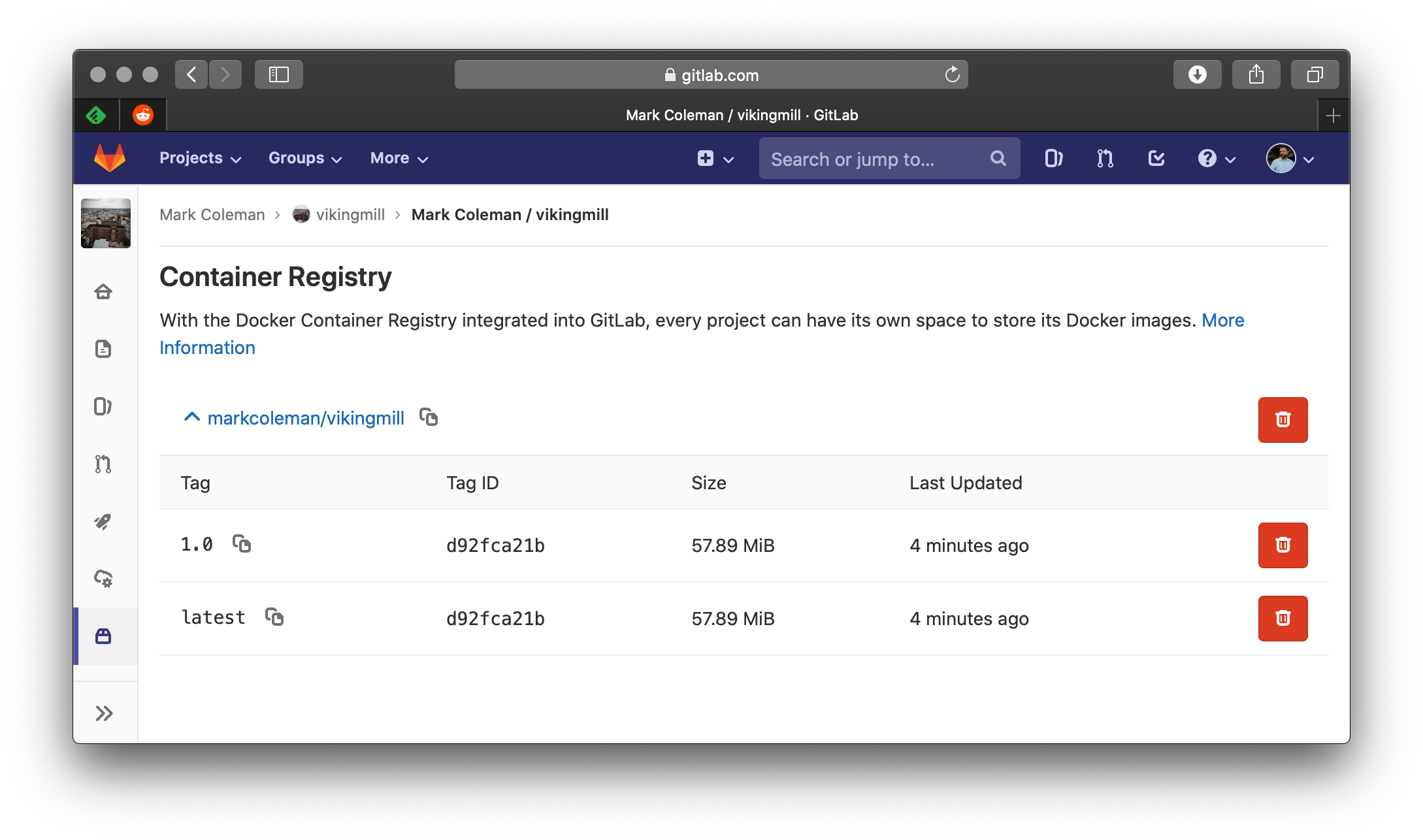
<h2 id="container-registry">Container Registry</h2>

<p><img src="/assets/blog-images/2019-07-28-push-container-to-registry-in-gitlab/01-screen-shot-2019-07-28-at-11.55.18-am.png" alt="Illustration from Push Container to Registry in GitLab (1)" /></p>]]></content><author><name>Kramnameloc</name></author><category term="cloud" /><category term="devops" /><category term="web" /><summary type="html"><![CDATA[Generate Personal Access Token for Docker Login Navigate over to the access token section in your profile. Scope to and set your expiration date. store this key]]></summary><media:thumbnail xmlns:media="http://search.yahoo.com/mrss/" url="https://kramnameloc.com/assets/images/social-card.svg" /><media:content medium="image" url="https://kramnameloc.com/assets/images/social-card.svg" xmlns:media="http://search.yahoo.com/mrss/" /></entry><entry><title type="html">Setting Up a GitLab Pipeline</title><link href="https://kramnameloc.com/setting-up-a-gitlab-pipeline/" rel="alternate" type="text/html" title="Setting Up a GitLab Pipeline" /><published>2019-07-27T11:38:19-04:00</published><updated>2019-07-27T11:38:19-04:00</updated><id>https://kramnameloc.com/setting-up-a-gitlab-pipeline</id><content type="html" xml:base="https://kramnameloc.com/setting-up-a-gitlab-pipeline/"><![CDATA[<p>I have been slowly exploring the free tier of <a href="https://www.gitlab.com">gitlab</a> and today wanted to setup a build in the <code class="language-plaintext highlighter-rouge">CI</code> job.  The following steps are taken to create a build of a static site via jekyll.</p>

<h2 id="create-gitlab-ciyml-">Create <code class="language-plaintext highlighter-rouge">.gitlab-ci.yml </code></h2>

<div class="language-bash highlighter-rouge"><div class="highlight"><pre class="highlight"><code><span class="nb">touch</span> .gitlab-ci.yml 
</code></pre></div></div>

<h3 id="edit-the-file">Edit the file</h3>

<p>As with any build script I simply put the steps I ran locally and placed them into the <code class="language-plaintext highlighter-rouge">yml</code> file.</p>

<div class="language-yaml highlighter-rouge"><div class="highlight"><pre class="highlight"><code><span class="na">image</span><span class="pi">:</span> <span class="s2">"</span><span class="s">ruby:2.5"</span>
<span class="na">build</span><span class="pi">:</span>
  <span class="na">script</span><span class="pi">:</span>
    <span class="pi">-</span> <span class="s">cd ./site/ &amp;&amp; bundle install</span>
    <span class="pi">-</span> <span class="s">bundle exec jekyll build</span>
    <span class="pi">-</span> <span class="s">zip -r site-build.zip ./_site</span>
</code></pre></div></div>

<p><em>note, unlike circleci each script execution will persist directory structure, e.g. <code class="language-plaintext highlighter-rouge">cd site</code> now puts you in the <code class="language-plaintext highlighter-rouge">site</code> folder for any  proceeding script items.</em></p>

<h3 id="the-first-error">The first Error</h3>

<div class="language-bash highlighter-rouge"><div class="highlight"><pre class="highlight"><code><span class="nv">$ </span>zip <span class="nt">-r</span> site-build.zip ./_site
/bin/bash: line 90: zip: <span class="nb">command </span>not found
</code></pre></div></div>

<p>It appears our image does not contain, <code class="language-plaintext highlighter-rouge">zip</code> so we will need to install it via a <code class="language-plaintext highlighter-rouge">before_script</code> block.</p>

<div class="language-yaml highlighter-rouge"><div class="highlight"><pre class="highlight"><code><span class="na">image</span><span class="pi">:</span> <span class="s2">"</span><span class="s">ruby:2.5"</span>
<span class="na">before_script</span><span class="pi">:</span>
  <span class="pi">-</span> <span class="s">apt-get install -y p7zip</span>
<span class="na">build</span><span class="pi">:</span>
  <span class="na">script</span><span class="pi">:</span>
    <span class="pi">-</span> <span class="s">cd ./site/ &amp;&amp; bundle install</span>
    <span class="pi">-</span> <span class="s">ls</span>
    <span class="pi">-</span> <span class="s">bundle exec jekyll build</span>
    <span class="pi">-</span> <span class="s">zip -r site-build.zip ./_site</span>
</code></pre></div></div>
<h3 id="another-error">Another Error</h3>

<div class="language-bash highlighter-rouge"><div class="highlight"><pre class="highlight"><code>root@item:/# apt-get <span class="nb">install </span>p7zip
Reading package lists... Done
Building dependency tree       
Reading state information... Done
E: Unable to locate package p7zip
</code></pre></div></div>

<p>I learned that since this is a fresh image you also need to run the <code class="language-plaintext highlighter-rouge">update</code> command first.</p>

<div class="language-bash highlighter-rouge"><div class="highlight"><pre class="highlight"><code>image: <span class="s2">"ruby:2.5"</span>
before_script:
  - apt-get update <span class="nt">-qy</span>
  - apt-get <span class="nt">-y</span> <span class="nb">install </span>zip unzip
</code></pre></div></div>

<p><em>Don’t forget to add in <code class="language-plaintext highlighter-rouge">-y</code> to auto answer the prompt.</em></p>

<h3 id="the-final-build-yml-file">The final build <code class="language-plaintext highlighter-rouge">yml</code> file</h3>

<div class="language-yaml highlighter-rouge"><div class="highlight"><pre class="highlight"><code><span class="na">image</span><span class="pi">:</span> <span class="s2">"</span><span class="s">ruby:2.5"</span>
<span class="na">before_script</span><span class="pi">:</span>
  <span class="pi">-</span> <span class="s">apt-get update -qy</span>
  <span class="pi">-</span> <span class="s">apt-get -y install zip unzip</span>
<span class="na">build</span><span class="pi">:</span>
  <span class="na">script</span><span class="pi">:</span>
    <span class="pi">-</span> <span class="s">cd ./site/ &amp;&amp; bundle install</span>
    <span class="pi">-</span> <span class="s">bundle exec jekyll build</span>
    <span class="pi">-</span> <span class="s">zip -r site-build.zip ./_site</span>
</code></pre></div></div>

<h2 id="artifacts">Artifacts</h2>

<p>Now we have all of your pieces in order and our build is successful next up getting an <a href="https://docs.gitlab.com/ee/user/project/pipelines/job_artifacts.html">artifact</a> of the build which happens to be the rendered site from <code class="language-plaintext highlighter-rouge">jekyll</code>.</p>

<h3 id="storing-the-contents-of-the-zip-as-an-artifact">Storing the contents of the zip as an artifact</h3>

<div class="language-bash highlighter-rouge"><div class="highlight"><pre class="highlight"><code>  artifacts:
    name: <span class="s2">"viking-mill"</span>
    paths:
      - ./site/site-build.zip
    expire_in: 30 days
</code></pre></div></div>

<p><em>note, this new block will reset to the root working folder so you need to specify the full path from the root</em></p>

<h2 id="the-final-gitlab-ciyml">The Final <code class="language-plaintext highlighter-rouge">.gitlab-ci.yml</code></h2>

<div class="language-yaml highlighter-rouge"><div class="highlight"><pre class="highlight"><code><span class="na">image</span><span class="pi">:</span> <span class="s2">"</span><span class="s">ruby:2.5"</span>
<span class="na">before_script</span><span class="pi">:</span>
  <span class="pi">-</span> <span class="s">apt-get update -qy</span>
  <span class="pi">-</span> <span class="s">apt-get -y install zip unzip</span>
<span class="na">build</span><span class="pi">:</span>
  <span class="na">script</span><span class="pi">:</span>
    <span class="pi">-</span> <span class="s">cd ./site/ &amp;&amp; bundle install</span>
    <span class="pi">-</span> <span class="s">bundle exec jekyll build</span>
    <span class="pi">-</span> <span class="s">zip -r site-build.zip ./_site</span>
  <span class="na">artifacts</span><span class="pi">:</span>
    <span class="na">name</span><span class="pi">:</span> <span class="s2">"</span><span class="s">viking-mill"</span>
    <span class="na">paths</span><span class="pi">:</span>
      <span class="pi">-</span> <span class="s">./site/site-build.zip</span>
    <span class="na">expire_in</span><span class="pi">:</span> <span class="s">30 days</span>
</code></pre></div></div>

<h2 id="finish">Finish</h2>

<p>Now we have a build setup inside of gitlab for the static jekyll site</p>]]></content><author><name>Kramnameloc</name></author><category term="devops" /><category term="web" /><category term="automation" /><summary type="html"><![CDATA[I have been slowly exploring the free tier of gitlab and today wanted to setup a build in the job. The following steps are taken to create a build of a static s]]></summary><media:thumbnail xmlns:media="http://search.yahoo.com/mrss/" url="https://kramnameloc.com/assets/images/social-card.svg" /><media:content medium="image" url="https://kramnameloc.com/assets/images/social-card.svg" xmlns:media="http://search.yahoo.com/mrss/" /></entry><entry><title type="html">My First Dockerfile</title><link href="https://kramnameloc.com/my-first-dockerfile/" rel="alternate" type="text/html" title="My First Dockerfile" /><published>2019-07-21T20:15:01-04:00</published><updated>2019-07-21T20:15:01-04:00</updated><id>https://kramnameloc.com/my-first-dockerfile</id><content type="html" xml:base="https://kramnameloc.com/my-first-dockerfile/"><![CDATA[<p>I have been experimenting with docker over the years off and on but never took the time to apply it to a real project.  Today that was going to change with a quick experiment building up a an <code class="language-plaintext highlighter-rouge">nginx</code> image and apply the output of a Jekyll site.</p>

<h3 id="dockerfile"><code class="language-plaintext highlighter-rouge">Dockerfile</code></h3>

<p>A <code class="language-plaintext highlighter-rouge">Dockerfile</code> is a document that specifies a source image and commands you wish to apply to that image where each command is a delta from the previous action.  This allows you to have a repeatable process of getting your image created.</p>

<div class="language-plaintext highlighter-rouge"><div class="highlight"><pre class="highlight"><code>FROM nginx:1.17.1
COPY site/_site /usr/share/nginx/html
</code></pre></div></div>

<p>This a rather trivial example but takes a <a href="https://docs.docker.com/engine/reference/commandline/tag/"><code class="language-plaintext highlighter-rouge">tag</code></a> of <a href="https://hub.docker.com/_/nginx"><code class="language-plaintext highlighter-rouge">nginix</code></a> version <code class="language-plaintext highlighter-rouge">1.17.1</code>.  I wanted to be sure to specify a known version as using <code class="language-plaintext highlighter-rouge">latest</code> while helpful could result in an image that no longer works as you have not control over what <code class="language-plaintext highlighter-rouge">latest</code> actually is when building.  The <code class="language-plaintext highlighter-rouge">COPY</code> command simply copies files from a source location to a destination location inside of the image.</p>

<h3 id="build-containersh"><code class="language-plaintext highlighter-rouge">build-container.sh</code></h3>

<p>Since the Dockerfile can only execute commands inside of the image I was unsure how to get the <code class="language-plaintext highlighter-rouge">Jekyll</code> site built from the start.  After a bit of searching it was recommended to create a simple <code class="language-plaintext highlighter-rouge">sh</code> script that executes the commands and then the corresponding <code class="language-plaintext highlighter-rouge">docker build .</code> command at the end.</p>

<div class="language-plaintext highlighter-rouge"><div class="highlight"><pre class="highlight"><code>cd site &amp;&amp; bundle exec jekyll build
cd ..
docker build . -t markcoleman/viking-mill:latest
</code></pre></div></div>

<h3 id="run-sitesh"><code class="language-plaintext highlighter-rouge">run-site.sh</code></h3>

<p>Now that we have the image built and tagged lets run it like any other image we have pulled and map a port of exposed port <code class="language-plaintext highlighter-rouge">8080</code> to container port <code class="language-plaintext highlighter-rouge">80</code> which is exposed by <code class="language-plaintext highlighter-rouge">nginix</code>.</p>

<div class="language-plaintext highlighter-rouge"><div class="highlight"><pre class="highlight"><code>docker run -d -p 8080:80 -i -t markcoleman/viking-mill:latest
</code></pre></div></div>

<p><em>Site running in an ngnix container</em>
<img src="/assets/blog-images/2019-07-21-my-first-dockerfile/01-screen-shot-2019-07-21-at-12.44.57-pm.png" alt="Viking Mill " /></p>

<p>Simple but yet very effective and allowed me to learn a bit more, next up how to automate this using gitlab.</p>]]></content><author><name>Kramnameloc</name></author><category term="web" /><category term="cloud" /><category term="devops" /><summary type="html"><![CDATA[Doing something with docker]]></summary><media:thumbnail xmlns:media="http://search.yahoo.com/mrss/" url="https://kramnameloc.com/assets/images/social-card.svg" /><media:content medium="image" url="https://kramnameloc.com/assets/images/social-card.svg" xmlns:media="http://search.yahoo.com/mrss/" /></entry><entry><title type="html">Find Your Turning Point(s)</title><link href="https://kramnameloc.com/find-your-turning-point-s/" rel="alternate" type="text/html" title="Find Your Turning Point(s)" /><published>2019-01-28T21:34:49-05:00</published><updated>2019-01-28T21:34:49-05:00</updated><id>https://kramnameloc.com/find-your-turning-point-s</id><content type="html" xml:base="https://kramnameloc.com/find-your-turning-point-s/"><![CDATA[<p>I typically write about my various interactions around technology in an effort to learn while forcing myself to share knowledge to other readers.  I personally find this approach the best way for me to learn since to share you must be confident on the topic at hand.  This post however is a mini self reflection of two turning points in my career and I challenge you to self reflect on your career to locate the turning points you might have in your career.  If you can not find one you need to take this as an opportunity to find your own turning point as it forces you to become better and transform to be a better version of yourself.</p>

<h2 id="thinking-i-knew-it-all">Thinking I Knew It All</h2>

<p>After college I got my first job as a developer at a small company building financial software for credit unions.  I was working there for a couple years increasing my skills from VB6, VB.NET, and eventually C#.  Life was grand I was in a small ecosystem with a limited presence with the online development community (it was 2003-2008 after all).  We still received binders of MSDN discs and assumed we knew it all.  The team was thriving and we were slinging code with visions of big home grown systems that solves numerous needs for our credit union clients.  This all came crashing down when this company was sold off to a competing company and I was forced to new experiences.</p>

<h2 id="being-humbled-and-not-knowing-anything---turning-point-1">Being Humbled and Not Knowing Anything - Turning Point 1</h2>

<p>At this new company I was around familiar faces, but integrated into the new company. A contractor was brought into the shop to assist in building core components of a high profile project.  His name was <a href="https://www.khalidabuhakmeh.com/">Khalid Abuhakmeh</a> and reflecting back this was the first turning point my my career that shot me down a different path.  He is one of the most passionate developers I had the opportunity to work with professionally and asked many questions of <code class="language-plaintext highlighter-rouge">"Why"</code></p>

<ul>
  <li>Why is this system built this way?</li>
  <li>Why is there no unit testing (could you even test this!?!)</li>
  <li>Why did you roll your own <code class="language-plaintext highlighter-rouge">X</code>? (where X is data access, logging, security, etc)</li>
  <li>Did you ever hear of using <code class="language-plaintext highlighter-rouge">Y</code>?</li>
</ul>

<p>Having someone around you that is passionate about development, encourages learning through pair programming, and reinforces all the ideals of development was something that helped shape me today.  These questions and openness to teach introduced me to a concept I was not familiar with in my traditional development mind.  This directed me down the path learning, reading, teaching, and complete self improvement as I wanted to answer all his questions and improve the code base.  What we did prior was by not any means bad, but we can strive to be better. Flash forward a months of questioning and improving on came the transition to a new opportunity at <a href="https://www.members1st.org">Members 1st FCU</a></p>

<h2 id="growing-and-learning">Growing and Learning</h2>

<p>A few former coworkers were already at Members 1st and dreams of software development danced in their heads of what could be based on what we have done in the past (and doing it <em>“right”</em> this time around).  My former supervisor was already working there and when the call was made three of us came roaring over to do what we do best, build credit union software.  We did indeed build software, we built core components to interact with the data processing system, integration points, web services, and eventually a Bill Payer system.  Development life was good again, we were building software, sharing new found inspiration pushing forward always striving for that ideal.</p>

<h2 id="progressing-forward---turning-point-2">Progressing Forward - Turning Point 2</h2>

<p>After living in this comfortable space for a coupe more years my partner in crime working at Members 1st FCU left for a new opportunity. This left a void (turning point 2) that needed filled to continue to move forward in our goals of building the best credit union software possible.  Through a series of events and support from my supervisor and team I was able to rise above this deficient and take  learning, leading, and empowering to the next level trying my hardest to build up the team.  If you are faced with a difficult situation that makes you feel uncomfortable seize that opportunity and do what it takes to rise above it.  As scary as it was this allowed me to mature to the next level in my career.</p>

<h2 id="repeat">Repeat</h2>

<p>To improve you need to be humbled and seize opportunities when they present them to yourself.  I personally feel you need to repeat this process continually throughout your career.</p>]]></content><author><name>Kramnameloc</name></author><category term="testing" /><category term="career" /><category term="dotnet" /><summary type="html"><![CDATA[Reflections on a career and paths traveled]]></summary><media:thumbnail xmlns:media="http://search.yahoo.com/mrss/" url="https://kramnameloc.com/assets/images/social-card.svg" /><media:content medium="image" url="https://kramnameloc.com/assets/images/social-card.svg" xmlns:media="http://search.yahoo.com/mrss/" /></entry><entry><title type="html">Azure ❤️ Terraform</title><link href="https://kramnameloc.com/azure-terraform/" rel="alternate" type="text/html" title="Azure ❤️ Terraform" /><published>2019-01-22T21:07:10-05:00</published><updated>2019-01-22T21:07:10-05:00</updated><id>https://kramnameloc.com/azure-terraform</id><content type="html" xml:base="https://kramnameloc.com/azure-terraform/"><![CDATA[<p>I recently have been exploring the concept of infrastructure as code and how all the core concepts we use day in day out in our software development life cycle could apply to infrastructure resources.  This idea eventually brought me to <a href="https://www.terraform.io">terraform</a> and how it can be applied to azure resources.  I started following along with the <a href="https://www.terraform.io/docs/providers/azurerm/index.html">Getting started guide for azure</a> and pieced together a couple steps to follow to get a new user to terraform up and running relatively quickly.</p>

<h2 id="setting-up-your-workstation">Setting Up Your Workstation</h2>

<p>Terraform authenticates to azure resources by leveraging the azure command line interface and the azure APIs and needs to be installed if you do not have it already.</p>

<p>Azure cli</p>

<div class="language-plaintext highlighter-rouge"><div class="highlight"><pre class="highlight"><code>brew install azure-cli
</code></pre></div></div>

<p>Install terraform</p>

<div class="language-plaintext highlighter-rouge"><div class="highlight"><pre class="highlight"><code> brew install terraform
</code></pre></div></div>

<p><em>Optional Visual Studio Code Extension</em> - This is an optional step, however the extension does increase productivity in VSCode for resource navigation and a module view.</p>

<div class="language-plaintext highlighter-rouge"><div class="highlight"><pre class="highlight"><code>code --install-extension ms-azuretools.vscode-azureterraform
</code></pre></div></div>

<h2 id="setting-your-azure-subscription">Setting Your Azure Subscription</h2>

<p>If you happen to have multiple azure subscriptions it is <em>important</em> you set the subscription id correctly otherwise you will be terraforming a subscription you probably did not plan on terraforming.</p>

<p>Login via the Azure cli</p>

<div class="language-plaintext highlighter-rouge"><div class="highlight"><pre class="highlight"><code>az login
</code></pre></div></div>

<p>List all of your Accounts and capture the <code class="language-plaintext highlighter-rouge">"id"</code> of the account you wish to terraform</p>

<div class="language-plaintext highlighter-rouge"><div class="highlight"><pre class="highlight"><code>❯ az account list
</code></pre></div></div>
<div class="language-plaintext highlighter-rouge"><div class="highlight"><pre class="highlight"><code>[
  {
    "cloudName": "AzureCloud",
    "id": "10000000-0000-0000-0000-000000000000",
    "isDefault": false,
    "name": "Subscription Name",
    "state": "Enabled",
    "tenantId": "00000000-0000-0000-0000-000000000000",
    "user": {
      "name": "email@user.name",
      "type": "user"
    }
  }
]
</code></pre></div></div>

<p>Set the subscription via the <code class="language-plaintext highlighter-rouge">"id"</code> you recored above.</p>

<div class="language-plaintext highlighter-rouge"><div class="highlight"><pre class="highlight"><code>az account set --subscription="10000000-0000-0000-0000-000000000000"
</code></pre></div></div>

<h2 id="setting-up-your-sample-project">Setting Up Your Sample Project</h2>

<p>Terraform works via <code class="language-plaintext highlighter-rouge">tf</code> configuration files that define your infrastructure resources.</p>

<div class="language-plaintext highlighter-rouge"><div class="highlight"><pre class="highlight"><code>touch core.tf
</code></pre></div></div>

<h3 id="define-the-provider">Define the Provider</h3>

<p>The first entry in your <code class="language-plaintext highlighter-rouge">tf</code> should be the provider you wish to target, in this case it is the azure resource manager.</p>

<div class="language-plaintext highlighter-rouge"><div class="highlight"><pre class="highlight"><code>provider "azurerm" {
}
</code></pre></div></div>

<p>Once that is defined and saved we will need to run the initialize command to pull down the azure provider plugin.</p>

<div class="language-plaintext highlighter-rouge"><div class="highlight"><pre class="highlight"><code>terraform init
Initializing provider plugins...
- Checking for available provider plugins on https://releases.hashicorp.com...
- Downloading plugin for provider "azurerm" (1.21.0)...
</code></pre></div></div>

<h3 id="our-first-resource">Our First Resource</h3>

<p>Now that we have a provider defined it is time to create our first resource.  The simplest resource to create is of course a resource group.</p>

<div class="language-plaintext highlighter-rouge"><div class="highlight"><pre class="highlight"><code>resource "azurerm_resource_group" "azurerm_resource_group" {
  name     = "azure-loves-terraform"
  location = "eastus"
}
</code></pre></div></div>

<p>Our resource is looking quite nice, but as any code it sure would be helpful to define a variable just in case we wish to switch the location around at will.  This can be accomplished with variables.</p>

<p>Create <code class="language-plaintext highlighter-rouge">variables.tf</code></p>

<div class="language-plaintext highlighter-rouge"><div class="highlight"><pre class="highlight"><code>variable "region" {
  default = "eastus"
}
</code></pre></div></div>

<p>Now with the variables file created we can alter our resource to reference that variable throughout our resource definition.</p>

<div class="language-plaintext highlighter-rouge"><div class="highlight"><pre class="highlight"><code>provider "azurerm" {}

resource "azurerm_resource_group" "azurerm_resource_group" {
  name     = "azure-loves-terraform"
  location = "${var.region}"
}
</code></pre></div></div>

<h2 id="trying-it-out">Trying It Out</h2>

<p>To publish any of our changes to our subscription we will need to execute a plan which refreshes the state from the defined terraform configuration and how it relates to the actual resources in our subscription.  This will show the diff needed via creations, updates, or deletions of resources based upon what terraform calculates.  We specify the <code class="language-plaintext highlighter-rouge">-out</code> flag so we can apply the change later. <em>This step does not actually push any changes</em></p>

<div class="language-plaintext highlighter-rouge"><div class="highlight"><pre class="highlight"><code>terraform plan -out build-core
Refreshing Terraform state in-memory prior to plan...
The refreshed state will be used to calculate this plan, but will not be
persisted to local or remote state storage.


------------------------------------------------------------------------

An execution plan has been generated and is shown below.
Resource actions are indicated with the following symbols:
  + create

Terraform will perform the following actions:

  + azurerm_resource_group.azurerm_resource_group
      id:       &lt;computed&gt;
      location: "eastus"
      name:     "azure-loves-terraform"
      tags.%:   &lt;computed&gt;


Plan: 1 to add, 0 to change, 0 to destroy.

------------------------------------------------------------------------

This plan was saved to: build-core

To perform exactly these actions, run the following command to apply:
    terraform apply "build-core"
</code></pre></div></div>

<p>If you examine the output you can see the plan will create one new resource in our subscription with 0 changes and 0 deletions.</p>

<p>To apply the changes and deploy to your subscription from the plan we can run the apply command with saved plan state.</p>

<div class="language-plaintext highlighter-rouge"><div class="highlight"><pre class="highlight"><code>terraform apply "build-core"  
azurerm_resource_group.azurerm_resource_group: Creating...
  location: "" =&gt; "eastus"
  name:     "" =&gt; "azure-loves-terraform"
  tags.%:   "" =&gt; "&lt;computed&gt;"
azurerm_resource_group.azurerm_resource_group: Creation complete after 1s (ID: /subscriptions/10000000-0000-0000-0000-000000000000/resourceGroups/azure-loves-terraform)

Apply complete! Resources: 1 added, 0 changed, 0 destroyed.
</code></pre></div></div>

<h2 id="welcome-infrastructure-as-code">Welcome Infrastructure as Code</h2>

<p>I am looking forward to more time exploring terraform and how it can assist in infrastructure drift, peer review, and the concept of continual delivery of infrastructure.</p>]]></content><author><name>Kramnameloc</name></author><category term="cloud" /><category term="devops" /><category term="career" /><summary type="html"><![CDATA[Getting started with terraform with the azure provider]]></summary><media:thumbnail xmlns:media="http://search.yahoo.com/mrss/" url="https://kramnameloc.com/assets/images/social-card.svg" /><media:content medium="image" url="https://kramnameloc.com/assets/images/social-card.svg" xmlns:media="http://search.yahoo.com/mrss/" /></entry><entry><title type="html">CPOSC 2018</title><link href="https://kramnameloc.com/cposc-2018/" rel="alternate" type="text/html" title="CPOSC 2018" /><published>2019-01-19T09:18:56-05:00</published><updated>2019-01-19T09:18:56-05:00</updated><id>https://kramnameloc.com/cposc-2018</id><content type="html" xml:base="https://kramnameloc.com/cposc-2018/"><![CDATA[<p>The end of last year I attended the first half of the Central Pennsylvania Open Source conference in Lancaster for the first time.  I enjoy attending local conferences and I will be sure to attend this in the future as it was filled with interesting topics presented by a group of passionate presenters.  I was quite impressed by the student showcase building robots, learning about linux laptops, and software defined radio. Below are some random notes and links during the my attendance.</p>

<hr />

<h2 id="radio-robots-and-real-time-video-a-showcase-of-student-technology-projects">Radio, Robots, and Real-time video: A showcase of student technology projects</h2>

<ul>
  <li><a href="https://www.blender.org">Blender</a></li>
  <li><a href="https://obsproject.com">OBS</a></li>
  <li><a href="https://www.turtlebot.com">Turtle Bot</a></li>
  <li><a href="http://www.ros.org">ROS</a></li>
  <li><a href="http://wiki.ros.org/rviz">RViz</a></li>
  <li><a href="https://www.sdr-radio.com">SDR (Software Defined Radio)</a></li>
</ul>

<hr />

<h2 id="graphql-for-the-rest-of-us-adding-a-graphql-api-to-a-rails-app">GraphQL for the REST of Us: Adding a GraphQL API to a Rails App</h2>

<ul>
  <li><a href="https://en.m.wikipedia.org/wiki/GraphQL">GraphQL via wiki</a></li>
  <li><a href="https://graphql.org">GraphQL</a></li>
</ul>

<blockquote>
  <p>Express your api as in your business domain</p>
</blockquote>

<ul>
  <li><a href="http://graphql-ruby.org">GraphQL in <code class="language-plaintext highlighter-rouge">ruby</code></a></li>
  <li><a href="https://github.com/graphql/graphiql">Interactive GraphQL</a></li>
</ul>

<blockquote>
  <p>Everything in graphql has to return something, mutation can be used for creation.</p>
</blockquote>

<blockquote>
  <p><a href="https://medium.com/slite/avoiding-n-1-requests-in-graphql-including-within-subscriptions-f9d7867a257d">Ensure you do not get yourself in a spot for the N+1 query issue…</a></p>
</blockquote>

<hr />

<h2 id="open-source-satellite-development">Open Source Satellite Development</h2>

<ul>
  <li><a href="https://www.beyond-earth.com">Beyond Earth</a></li>
  <li><a href="https://mini-cubes.com">Mini Cubes</a></li>
  <li><a href="https://en.m.wikipedia.org/wiki/PocketQube">Pocket Cube</a></li>
  <li><a href="https://www.radiobro.com/minisatcom-uhf-product-family/">Radio Bro</a></li>
  <li><a href="http://www.trisolx.com/solar-cells/">Solar Cells</a></li>
</ul>

<blockquote>
  <p>Lasts 4-5 Years life span</p>
</blockquote>

<h2 id="power">Power</h2>
<ul>
  <li>CPU - 10 Watts</li>
  <li>Radio - 1 Watt</li>
  <li>Sensor - 2 Watts</li>
  <li>Battery recharge - 2 Watts</li>
  <li>Total Power - 15 Watts</li>
</ul>

<h2 id="software">Software</h2>

<ul>
  <li>Ubuntu</li>
  <li>Lamp</li>
  <li>Python for GPIO</li>
  <li>Python for PHP Bridge</li>
</ul>

<h2 id="get-data-back">Get data back</h2>

<ul>
  <li>Uses TCP/IP system</li>
  <li>Slow 9600 bps to 38kbps (on a good day)</li>
  <li>Mostly sensor data</li>
  <li>Occasional image (could take 4 days to retrieve an image)</li>
</ul>

<h2 id="the-demo-unit">The Demo Unit</h2>

<p>Built a Pocket Quebec based web server</p>

<p><code class="language-plaintext highlighter-rouge">discovery.simple-url.com:8080</code></p>

<h2 id="going-to-space">Going to Space</h2>

<ul>
  <li>Launching Q2 - Q4 2019</li>
  <li>Currently scheduled on Alba Orbital Cluster 2</li>
  <li>Flying on a RocketLabs Electron from New Zealand</li>
</ul>

<h2 id="what-can-go-wrong">What Can Go Wrong</h2>

<ul>
  <li>Failure to reach orbit (XKCD Up Goer Five)</li>
  <li>Power Failure</li>
  <li>Communication errors</li>
</ul>

<h2 id="paying-for-it-all">Paying For It All</h2>

<ul>
  <li>Expected to build with 50k budget</li>
  <li>Actual costs close to 100k</li>
  <li>Launching a Kickstarter to raise remaining funds</li>
  <li>Launch cost is 30k (most expensive portion of the budget) hopeful the launch will go down to 10-15k (the problem is the paperwork and integration to know what it is and what it is going to do)</li>
</ul>

<blockquote>
  <p>For around 8k you can create an antenna and join a collection that receives data.
https://satnogs.org</p>
</blockquote>]]></content><author><name>Kramnameloc</name></author><category term="career" /><category term="raspberry-pi" /><summary type="html"><![CDATA[Random notes while attending the Central Pennsylvania Open Source Conference on December 1, 2018]]></summary><media:thumbnail xmlns:media="http://search.yahoo.com/mrss/" url="https://kramnameloc.com/assets/images/social-card.svg" /><media:content medium="image" url="https://kramnameloc.com/assets/images/social-card.svg" xmlns:media="http://search.yahoo.com/mrss/" /></entry><entry><title type="html">BarCamp 2017</title><link href="https://kramnameloc.com/barcamp-2017/" rel="alternate" type="text/html" title="BarCamp 2017" /><published>2017-10-14T11:49:38-04:00</published><updated>2017-10-14T11:49:38-04:00</updated><id>https://kramnameloc.com/barcamp-2017</id><content type="html" xml:base="https://kramnameloc.com/barcamp-2017/"><![CDATA[<p>This is random notes gathered while attending the Harrisburg BarCamp 2017.</p>

<p>#Small Data, Big Results
http://noboundsdigital.com</p>

<p>Problems with big data, example of being marketed to a product/service even when the data is incorrect. (new baby marketing when family lost the child)</p>

<p>Big Data is often dumb data, do you have talent inhouse to crunch all this data.</p>

<p>Small Data can be actionable and easier to understand and handle it effectively.</p>

<p>Trim down the many data points and focus on the easy parts that actually is helpful (web analytics), this helps you build out digital KPI that is actually useful.</p>

<p>https://www.martinlindstrom.com/small-data/</p>

<p><strong>Buyer Journey</strong></p>
<ul>
  <li>Awareness</li>
  <li>Consideration</li>
  <li>Decision</li>
</ul>

<p><strong>How to get better results</strong></p>
<ul>
  <li>Intentionally observe</li>
  <li>Brainstorm ideas, how to make things simple for the user</li>
  <li>implement, try to keep the changes small
re-evaulate</li>
</ul>

<p>How users interact with your website
https://www.hotjar.com</p>

<p>This will show you where people are clicking or not clicking in your site.</p>

<p>Realtime interaction points for a site to offer assitance can help users that are struggling at that point in time.</p>

<p>Small Data is collected for a short period of time and than thrown away. (or end results could just be kept but not the data itself)</p>

<p><strong>Text Mining</strong>
https://rapidminer.com</p>

<p>Focus on one persons problems of how they start and fail doing an action.</p>

<p>Unmonitored “chat” might be ok as it is better to get the question then no question at all. (this can be done if you set expectations to the end user)</p>

<p><strong>Chat Service</strong>
https://www.intercom.com/live-chat</p>

<p>#Cloud Based Programming
Open discussion on how to leverage the cloud.</p>

<p><strong>Random Topics and Links</strong></p>
<ul>
  <li><a href="https://golang.org">Go</a></li>
  <li><a href="https://aws.amazon.com">AWS</a></li>
  <li><a href="https://azure.microsoft.com">Azure</a></li>
  <li><a href="https://cloud.google.com/compute/">Google Compute</a></li>
  <li><a href="https://www.docker.com">Docker</a></li>
  <li><a href="https://www.linux.com/news/8-open-source-CONTAINER-ORCHESTRATION-TOOLS-KNOW">Container Orchestration</a></li>
  <li><a href="https://www.postgresql.org/docs/9.6/static/datatype-json.html">PostgreSql Json</a></li>
</ul>]]></content><author><name>Kramnameloc</name></author><category term="cloud" /><category term="career" /><category term="web" /><summary type="html"><![CDATA[the unconference in Harrisburg, PA]]></summary><media:thumbnail xmlns:media="http://search.yahoo.com/mrss/" url="https://kramnameloc.com/assets/images/social-card.svg" /><media:content medium="image" url="https://kramnameloc.com/assets/images/social-card.svg" xmlns:media="http://search.yahoo.com/mrss/" /></entry><entry><title type="html">Using Jekyll: Step 0</title><link href="https://kramnameloc.com/using-jekyll-step-0/" rel="alternate" type="text/html" title="Using Jekyll: Step 0" /><published>2016-03-27T16:33:10-04:00</published><updated>2016-03-27T16:33:10-04:00</updated><id>https://kramnameloc.com/using-jekyll-step-0</id><content type="html" xml:base="https://kramnameloc.com/using-jekyll-step-0/"><![CDATA[<p>Over the past year I have been hearing about <a href="https://jekyllrb.com">Jekyll</a> as a simple solution for creating static content for a websites/blogs without having to worry about a database.  I think today is the day I actually do something about this and get something up and running.</p>

<p>##Step -1</p>

<p>As I do with most things I dive right in (sometimes reading docs first) and issuesd the command <code class="language-plaintext highlighter-rouge">gem install jekyll</code>. Unfortunately this did not work as intended and I was presented with this error message.</p>

<blockquote>
  <p>…You don’t have write permissions for the /Library/Ruby/Gems/2.0.0 directory. …</p>
</blockquote>

<p>This error sent me down the path of RVM (ruby version manager) in an attempt to get ruby installed without having to resort to <code class="language-plaintext highlighter-rouge">sudo</code> everything (bad news bears).  After learning this was the system installation of ruby (and shouldn’t be touched unless you know what you are doing and I don’t…yet…) I then went down the path of rbenv which allowed you to handle various ruby installations which seemed to work however anytime I ran <code class="language-plaintext highlighter-rouge">ruby -v</code> it would continue to use the system ruby install.  I was about to give up and use <code class="language-plaintext highlighter-rouge">sudo</code> but then remembered about <a href="http://brew.sh">homebrew</a>.  I ran the command<code class="language-plaintext highlighter-rouge">brew install ruby</code> and it did its magic.  Now when I run <code class="language-plaintext highlighter-rouge">ruby -v</code> it reported version 2.3.0 which was just installed by brew.  Yes! We are not using the system version of ruby anymore and we should be able to install gems without resorting to <code class="language-plaintext highlighter-rouge">sudo</code></p>

<p>##Step 0</p>

<p>Ok back to the steps from the Jekyll website.</p>

<ul>
  <li><code class="language-plaintext highlighter-rouge">gem install jekyll</code> <em>intall the gem</em></li>
  <li><code class="language-plaintext highlighter-rouge">jekyll m1bytes</code> <em>creates the base strucutre</em></li>
  <li><code class="language-plaintext highlighter-rouge">cd m1bytes</code> <em>navigate to the new directory</em></li>
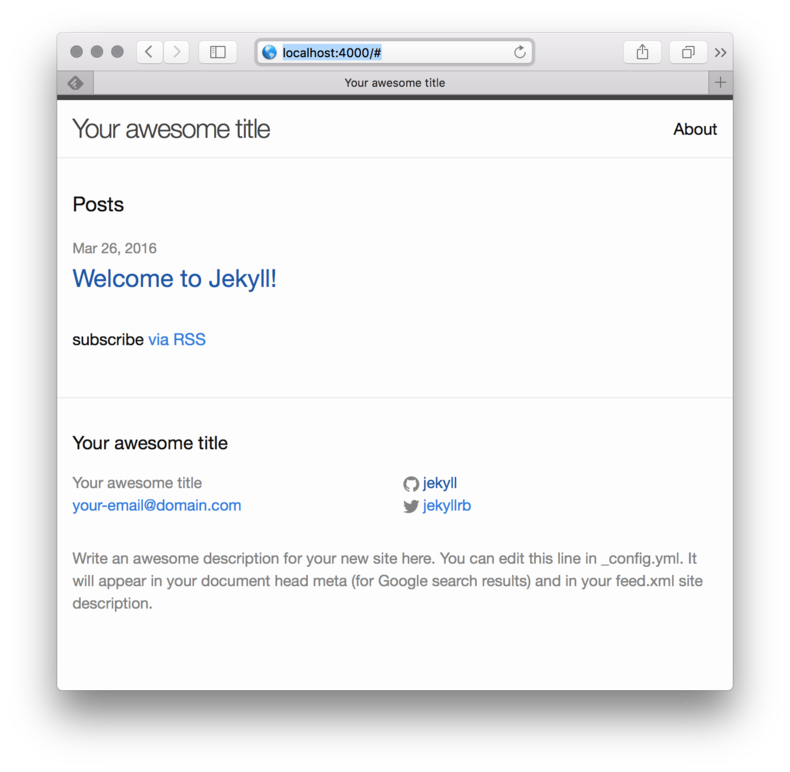
  <li><code class="language-plaintext highlighter-rouge">jekyll serve</code> <em>serves the app on port 4000</em></li>
</ul>

<p><img src="/assets/blog-images/2016-03-27-using-jekyll-step-0/01-image_large.png" alt="jekyll" /></p>

<p>We have Jekyll installed, created a simple site, and have it serving successfully.  This was a simple process however my struggle was not with Jekyll itself but with my environment.  Next up I need to learn how to apply a template.</p>]]></content><author><name>Kramnameloc</name></author><category term="web" /><category term="career" /><category term="devops" /><summary type="html"><![CDATA[The very start of learning Jekyll along with a few struggles.]]></summary><media:thumbnail xmlns:media="http://search.yahoo.com/mrss/" url="https://kramnameloc.com/assets/images/social-card.svg" /><media:content medium="image" url="https://kramnameloc.com/assets/images/social-card.svg" xmlns:media="http://search.yahoo.com/mrss/" /></entry><entry><title type="html">Hello AngularJs 2</title><link href="https://kramnameloc.com/hello-angularjs-2/" rel="alternate" type="text/html" title="Hello AngularJs 2" /><published>2016-01-03T20:15:29-05:00</published><updated>2016-01-03T20:15:29-05:00</updated><id>https://kramnameloc.com/hello-angularjs-2</id><content type="html" xml:base="https://kramnameloc.com/hello-angularjs-2/"><![CDATA[<p>I have been doing angular development for almost two years now building/maintaining an <a href="https://myonline.members1st.org">online banking application</a>.  We first started off with version 1 of <a href="http://www.angularjs.org">angularjs</a> and slowly upgraded to 1.2.8 which currently is considered legacy 🤕.  We need to make the movement to push forward now that we “officially” dropped support of IE8 (people ask why so long, but a large vocal percentage was using IE8 at the start of the year and we didn’t want to intentionally break anything).</p>

<p>Through a series of events we actually built our system with typescript which turned out to be a stroke of good luck since angular2 is officially using typescript.  Today is the day I actually build something with AngularJs and the best way to do that is to use the <a href="https://angular.io/docs/ts/latest/quickstart.html">quick start</a></p>

<p><strong>Files Created</strong></p>

<p><strong>app.component.ts</strong></p>

<div class="language-plaintext highlighter-rouge"><div class="highlight"><pre class="highlight"><code>import {Component} from 'angular2/core';

@Component({
    selector: 'my-app',
    template: '&lt;h1&gt;Hello Angular Js 2&lt;/h1&gt;'
})
export class AppComponent { }
</code></pre></div></div>

<p><strong>boot.ts</strong></p>

<div class="language-plaintext highlighter-rouge"><div class="highlight"><pre class="highlight"><code>import {bootstrap}    from 'angular2/platform/browser'
import {AppComponent} from './app.component'

bootstrap(AppComponent);
</code></pre></div></div>

<p><strong>index.html</strong></p>

<div class="language-plaintext highlighter-rouge"><div class="highlight"><pre class="highlight"><code>&lt;html&gt;

&lt;head&gt;
    &lt;title&gt;Angular 2 QuickStart&lt;/title&gt;

    &lt;!-- 1. Load libraries --&gt;
    &lt;script src="node_modules/angular2/bundles/angular2-polyfills.js"&gt;&lt;/script&gt;
    &lt;script src="node_modules/systemjs/dist/system.src.js"&gt;&lt;/script&gt;
    &lt;script src="node_modules/rxjs/bundles/Rx.js"&gt;&lt;/script&gt;
    &lt;script src="node_modules/angular2/bundles/angular2.dev.js"&gt;&lt;/script&gt;

    &lt;!-- 2. Configure SystemJS --&gt;
    &lt;script&gt;
        System.config({
            packages: {
                app: {
                    format: 'register',
                    defaultExtension: 'js'
                }
            }
        });
        System.import('app/boot')
                .then(null, console.error.bind(console));
    &lt;/script&gt;

&lt;/head&gt;

&lt;!-- 3. Display the application --&gt;
&lt;body&gt;
&lt;my-app&gt;Loading...&lt;/my-app&gt;
&lt;/body&gt;

&lt;/html&gt;
</code></pre></div></div>

<p><strong>package.json</strong></p>

<div class="language-plaintext highlighter-rouge"><div class="highlight"><pre class="highlight"><code>{
  "name": "angular2-quickstart",
  "version": "1.0.0",
  "scripts": {
    "tsc": "tsc",
    "tsc:w": "tsc -w",
    "lite": "lite-server",
    "start": "concurrent \"npm run tsc:w\" \"npm run lite\" "
  },
  "license": "ISC",
  "dependencies": {
    "angular2": "2.0.0-beta.0",
    "systemjs": "0.19.6",
    "es6-promise": "^3.0.2",
    "es6-shim": "^0.33.3",
    "reflect-metadata": "0.1.2",
    "rxjs": "5.0.0-beta.0",
    "zone.js": "0.5.10"
  },
  "devDependencies": {
    "concurrently": "^1.0.0",
    "lite-server": "^1.3.1",
    "typescript": "^1.7.3"
  }
}
</code></pre></div></div>

<p><strong>tsconfig.json</strong></p>

<div class="language-plaintext highlighter-rouge"><div class="highlight"><pre class="highlight"><code>{
  "compilerOptions": {
    "target": "ES5",
    "module": "system",
    "moduleResolution": "node",
    "sourceMap": true,
    "emitDecoratorMetadata": true,
    "experimentalDecorators": true,
    "removeComments": false,
    "noImplicitAny": false
  },
  "exclude": [
    "node_modules"
  ]
}
</code></pre></div></div>

<p><em>All of this was from the quick start guide</em></p>

<p>After doing <code class="language-plaintext highlighter-rouge">npm start</code></p>

<p>#Success
<img src="/assets/blog-images/2016-01-03-hello-angularjs-2/01-screen-shot-2016-01-03-at-8.12.54-pm_large.png" alt="Illustration from Hello AngularJs 2 (1)" /></p>

<p><em>mental recap</em></p>

<ul>
  <li>Angularjs looks familiar but yet foreign</li>
  <li>I need to learn more about boot, components, and <a href="https://github.com/systemjs/systemjs">SystemJs</a></li>
  <li>I need to learn about the <a href="http://angularjs.blogspot.com/2015/08/angular-1-and-angular-2-coexistence.html">upgrade guide</a></li>
</ul>]]></content><author><name>Kramnameloc</name></author><category term="javascript" /><category term="web" /><category term="automation" /><summary type="html"><![CDATA[C LOG 32]]></summary><media:thumbnail xmlns:media="http://search.yahoo.com/mrss/" url="https://kramnameloc.com/assets/images/social-card.svg" /><media:content medium="image" url="https://kramnameloc.com/assets/images/social-card.svg" xmlns:media="http://search.yahoo.com/mrss/" /></entry></feed>